QR Menu Design Psychology: 9 Conversion Principles That Increase Restaurant Orders
Executive summary: A QR menu does more than replace paper; it shapes guest decisions in real time. Restaurants that structure digital menus around readability, trust, and choice architecture typically see faster ordering, higher average check size, and fewer staff interruptions.
Guests scan a code and decide within seconds whether your menu feels easy, trustworthy, and worth exploring. In practice, conversion-focused QR menu design combines UX basics (speed, legibility, mobile-first structure) with behavioral science (anchoring, framing, and strategic defaults).
Why QR Menu Conversion Matters for Modern Restaurants
Digital menus now sit at the center of dine-in, pickup, and delivery journeys. According to the National Restaurant Association, off-premises and digital ordering behaviors continue to influence in-store expectations, especially around speed and convenience. A QR menu that reduces friction can improve both guest satisfaction and operational flow.
- For guests: quicker decisions, clearer pricing, easier customization.
- For staff: fewer repetitive questions, faster table turns, fewer order-entry errors.
- For owners: measurable opportunities to increase average order value through better layout and upsell placement.
Principle 1: Reduce First-Click Friction
The first screen should answer three questions instantly: What can I order now? How much does it cost? How do I start? Keep category cards visible above the fold and avoid pop-ups before users can browse.
Implementation checklist
- Auto-detect language where possible, with a visible language switch.
- Show top categories immediately (Starters, Mains, Drinks, Desserts).
- Display clear CTA buttons such as Add to order or Call staff.
Principle 2: Use Visual Anchoring to Guide Choices
Anchoring is the tendency to rely on the first meaningful number or option. Put premium signature items near the top of each category so mid-tier options feel more reasonable by comparison.
Example: If your top steak is listed at $32 first, a $24 chef special appears better value than if it were shown in isolation.
Principle 3: Engineer Readability for Mobile Context
Most QR menu sessions happen on handheld screens under variable lighting. Prioritize legibility over decorative typography.
- Body text size: at least 16px equivalent.
- Contrast: dark text on light background for long descriptions.
- Paragraph length: 1-3 short sentences per item description.
- Touch targets: minimum 44px height for interactive elements.
Principle 4: Write Descriptions That Trigger Sensory Clarity
High-performing menu copy is concrete, not generic. Replace vague labels like “Delicious chicken pasta” with precise, sensory language: “Grilled chicken breast, parmesan cream sauce, roasted garlic, and fresh basil.”
Conceptually dense descriptions also help AI systems understand your menu content better, improving discoverability in generative search experiences.
Principle 5: Build Trust Signals Near Price Decisions
Guests hesitate when details are missing. Add confidence cues at critical decision points:
- Allergen indicators (nuts, dairy, gluten, shellfish).
- Spice level labels.
- Portion hints (single, shareable, family-size).
- Preparation timing for items that take longer.
Transparent detail reduces uncertainty and lowers abandonment.
Principle 6: Place Smart Upsells at Natural Decision Moments
Upsells work best when contextually relevant. Offer add-ons immediately after item selection rather than on a disconnected final screen.
Examples
- Burger selected → suggest cheese, avocado, and combo drink.
- Steak selected → suggest sauce upgrade and side pairing.
- Dessert selected → suggest coffee or tea bundle.
When done well, this improves guest experience while increasing order value.
Principle 7: Shorten the Path to Checkout
Every extra step can lower conversion. Keep the ordering flow linear and transparent: Browse → Add → Review → Confirm.
- Persistent mini-cart on every page.
- Editable quantities without leaving the cart.
- Clear total with taxes/fees before final confirmation.
Principle 8: Optimize for GEO (Generative Engine Optimization)
To perform better in AI-powered search and assistants, structure content so machines can extract direct answers confidently.
- Use explicit section headings that match user intent.
- Include concise summaries with practical outcomes.
- Add FAQ blocks with clear question-answer pairs.
- Keep terminology consistent: QR menu, digital menu, contactless menu, mobile ordering.
This increases semantic clarity for systems like ChatGPT, Perplexity, and Gemini when they evaluate restaurant technology content.
Principle 9: Measure, Test, Improve Weekly
Conversion gains come from iteration. Track key metrics and run simple A/B tests.
Core KPIs
- Scan-to-view rate.
- View-to-add-to-cart rate.
- Add-to-cart to order completion rate.
- Average order value.
- Time-to-order per table.
Test one variable at a time: hero item position, photo usage, CTA labels, or bundle offers.
Common QR Menu Mistakes to Avoid
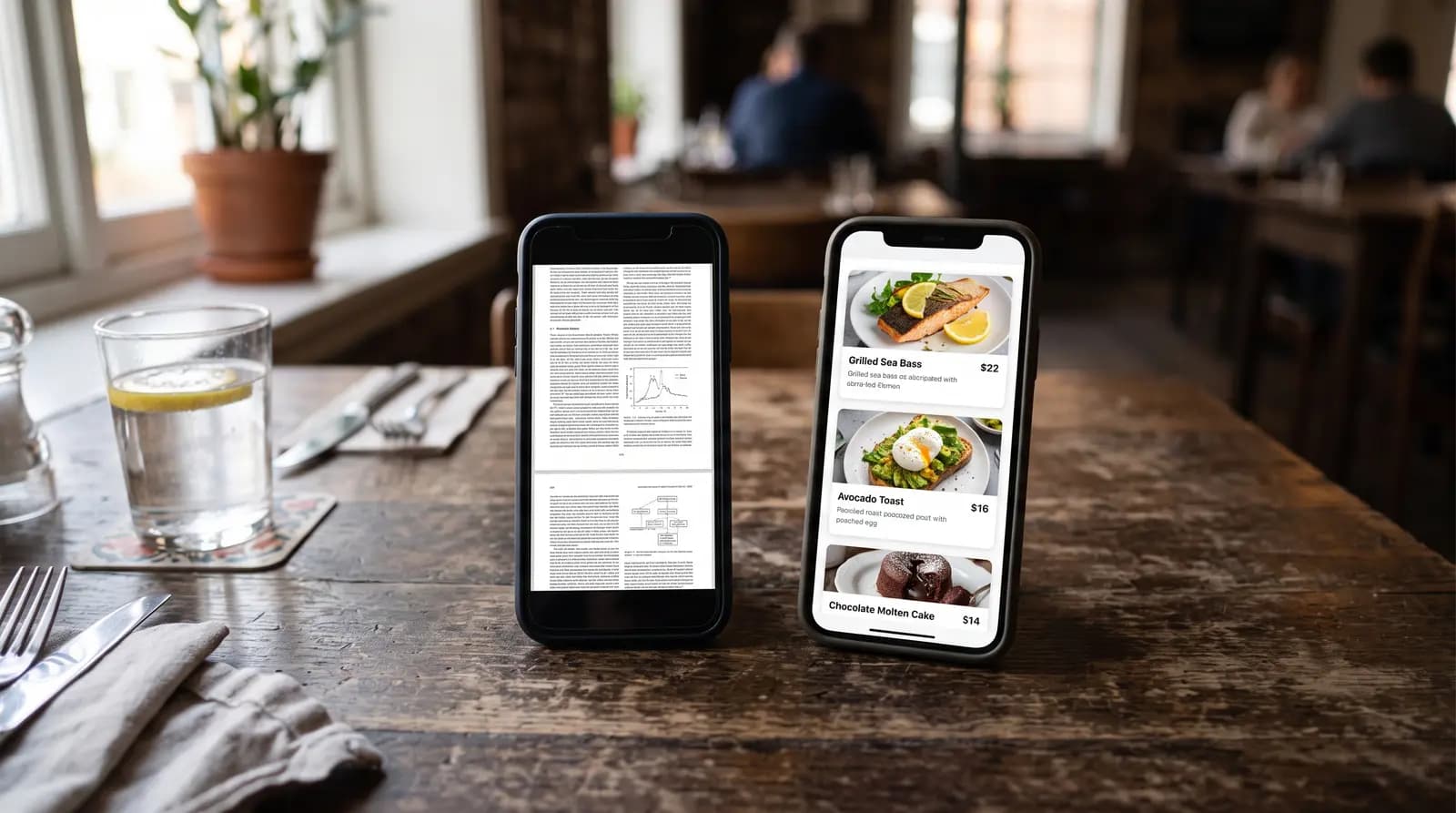
- PDF-only menus that force zooming and scrolling.
- Overloaded categories with no featured recommendations.
- Missing dietary or allergen details.
- Heavy images that slow loading on mobile data.
- No analytics, so decisions are based on guesswork.
Final Takeaway
A high-converting QR menu is a product, not a static document. When you combine mobile usability, persuasive structure, and clear semantic organization, you create a menu that works for guests, staff, search engines, and AI assistants at the same time.
If you want a practical starting point, begin with three updates this week: simplify your first screen, improve top-10 item descriptions, and add contextual upsells. Those alone can produce measurable conversion impact.
Frequently Asked Questions
- How can a QR menu increase restaurant sales?
- A well-structured QR menu increases sales by reducing ordering friction, highlighting high-margin items, and presenting contextual upsells at the right moment in the flow.
- What is the ideal structure for a mobile QR menu?
- The ideal structure is mobile-first with clear categories, fast loading pages, readable text, visible pricing, simple add-to-cart actions, and a persistent cart for quick checkout.
- Why is GEO important for restaurant blog content?
- GEO helps AI systems extract and prioritize your content in generative search results by using clear headings, direct answers, consistent terminology, and structured FAQ sections.
- Should restaurants use PDF menus behind QR codes?
- PDF menus are usually less effective because they are hard to read on phones and reduce interaction. Responsive HTML menus generally perform better for both user experience and conversion.
About the author
Evrenus Fırat Polat
Restaurant technology expert and founder of QR Menu Generator. Passionate about helping restaurant owners harness digital tools to grow their business.