QR Code Menu vs PDF Menu: 7 Differences That Matter in 2026
Most "QR menus" in the wild are actually PDF files behind a QR code — and guests can tell. A PDF menu and a real QR code menu differ in seven concrete ways: updating, mobile readability, search visibility, languages, analytics, allergen handling and long-run cost. A PDF is a print file pushed onto a phone screen; a QR code menu is a web page built for that screen. This guide walks through each difference so you can decide which your restaurant actually needs.
Key Takeaways
- PDF menus are static print files — every change means re-export, re-upload and hoping nobody cached the old file.
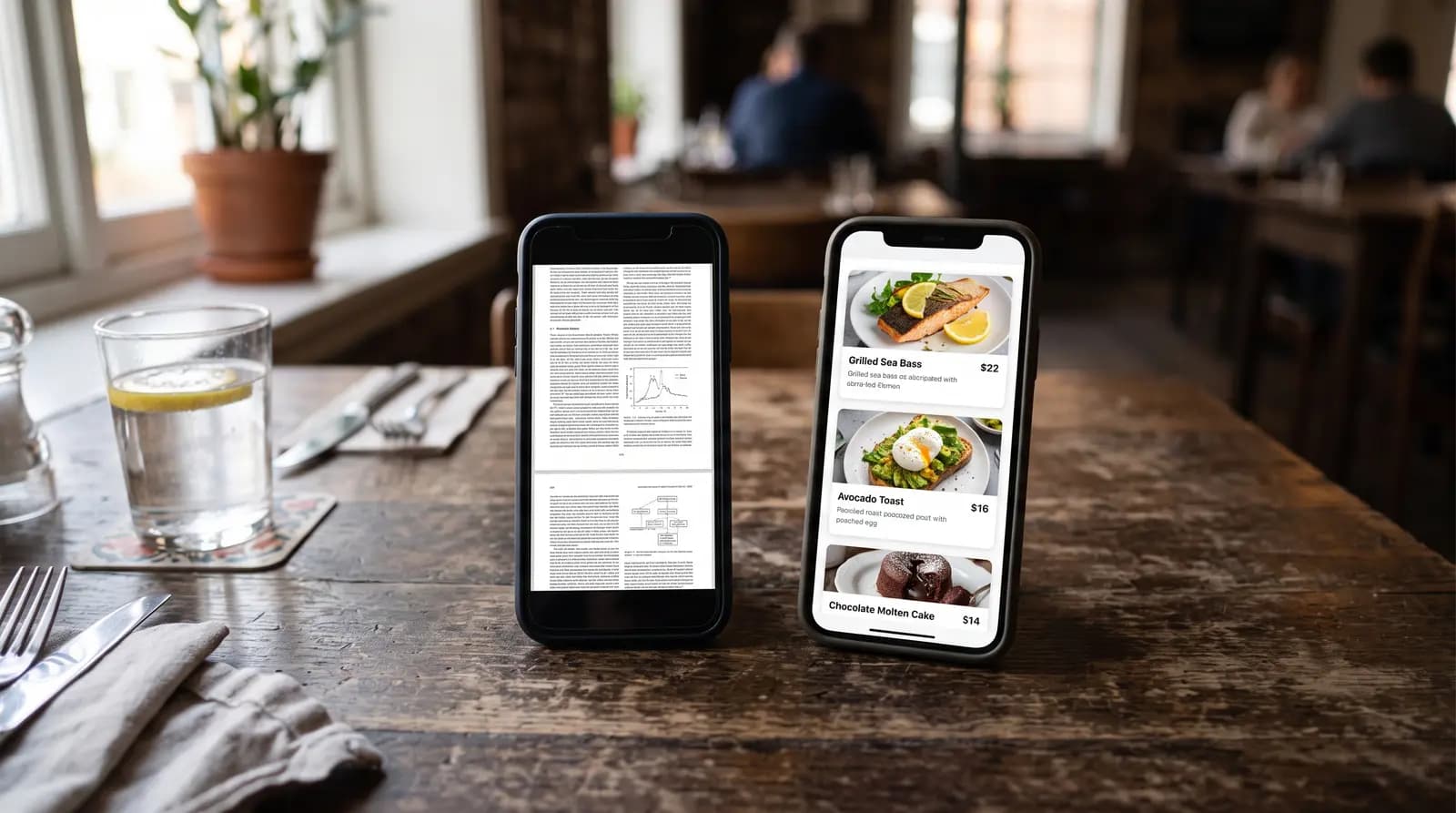
- Guests pinch-zoom PDFs. On a phone, an A4-formatted PDF renders at roughly a third of readable size; interactive menus adapt to the screen.
- Search engines and AI assistants cannot meaningfully read a PDF menu — an HTML menu page can rank, emit Menu schema and be cited.
- Languages, analytics and allergen filters only exist on interactive menus. A PDF is the same for every guest.
- Switching takes minutes in 2026: AI menu import reads your existing PDF or a photo and rebuilds it as a structured digital menu.
Table of Contents
1. Updating the Menu — Reprint Cycle vs Instant
A PDF menu lives in your designer's export folder. Raising one price means opening the source file, re-exporting, re-uploading and replacing the link — so in practice, PDF menus are updated in batches a few times a year, and guests see stale prices in between. Browsers and phones also cache PDFs aggressively; some guests keep seeing the old file after you replace it.
An interactive QR menu updates from a dashboard: change the price, and every phone that scans from that second sees the new one. Sold out of a dish mid-service? Hide it with one tap instead of announcing it table by table.
2. Mobile Readability — Pinch-Zoom vs Built for the Screen
PDFs are laid out for A4 or letter paper. On a 6-inch phone screen the text renders at roughly a third of comfortable reading size, so guests pinch, zoom, scroll sideways, lose their place and give up on the second page. It is the single most common complaint about "QR menus" — and it is not a QR problem, it is a PDF problem.
An interactive menu is a mobile web page: categories are tappable, dishes are cards with photos, text is set at phone size. No zooming, no sideways scrolling, no 8 MB download on table WiFi.
3. Search & AI Visibility — Invisible vs Indexable
When someone searches "vegan restaurant near me" or asks an AI assistant what is on your menu, a PDF gives search engines almost nothing to work with: no structured data, no per-dish markup, usually not even mobile-friendly signals. Your menu — the content guests search for most — is effectively invisible.
An HTML menu page can emit Restaurant and Menu structured data that Google and AI assistants parse dish by dish. Restaurants with structured menus can surface for dish-level searches and be cited by AI tools answering questions about them; menu pages hosted this way rank in ordinary Google results and bring the restaurant traffic a PDF never will.
4. Languages — One Fixed File vs Guest's Choice
A PDF shows every guest the same language. Serving tourists means either a cluttered dual-language layout or separate PDFs behind separate codes — which nobody maintains for long. An interactive QR menu shows a language switcher: the same printed code serves English, German, Arabic or any of a dozen more, and platforms with AI translation keep every language in sync automatically when the menu changes.
5. Analytics — Blind vs Measured
A PDF tells you nothing: not how many guests opened the menu, not which dishes they lingered on, not when traffic peaks. An interactive menu counts scans and views per day and per dish, which answers practical questions — is the new dessert getting looked at but not ordered (a pricing problem) or not looked at (a placement problem)?
6. Allergens & Dietary Info — Footnote vs Filterable
EU Regulation 1169/2011 obliges restaurants to declare 14 allergens for every dish. On a PDF this becomes a footnote legend ("1,3,7") that guests must decode — and that you must keep correct across every language version by hand. Interactive menus attach standardised allergen and diet labels to each dish, translated with the menu, and let guests see at a glance what is gluten-free or vegan. For EU restaurants this difference is not cosmetic; it is compliance.
7. Cost Over Time — "Free" That Isn't
The PDF looks free because the file already exists. The real costs arrive on a schedule: designer time for every update, reprints when the layout changes, lost sales from stale prices and unreadable pages, and zero search presence. Interactive QR menus run $0-$10/month for a single venue in 2026 — usually less than one designer invoice per year — and the platform maintains itself.
Comparison Table
| Aspect | PDF menu | QR code menu (interactive) |
|---|---|---|
| Price change | Re-export, re-upload, cache risk | Live in seconds |
| Mobile reading | Pinch-zoom an A4 page | Built for phone screens |
| Search engines & AI | Effectively invisible | Indexable page + Menu schema |
| Languages | One fixed language per file | Guest picks; AI keeps translations in sync |
| Analytics | None | Scans, views, per-dish interest |
| Allergen info | Manual footnote legend | Standardised labels per dish, translated |
| Typical cost | "Free" + designer time per change | $0-$10/month flat |
When a PDF Menu Is Actually Fine
Honesty matters: a PDF is defensible if your menu is a single page, changes once a year, serves one language, and your guests skew toward print anyway — a tasting-menu restaurant with a fixed seasonal card loses little. It is also fine as a download option alongside an interactive menu for guests who want to save it. What ages badly is a multi-page, multi-language, frequently-changing menu trapped in a print file.
How to Switch From PDF to a Real QR Menu in 10 Minutes
Step 1 — Import. Upload your existing PDF or a clear photo of the printed menu to a platform with AI menu import; it extracts categories, dishes, descriptions and prices automatically. Step 2 — Review. Fix anything the AI misread, add photos to your bestsellers, attach allergen labels. Step 3 — Point your code. Print the new QR code — or if your existing printed code points to a short link you control, just repoint it and your table tents keep working.
QR Menu Generator does all three on the free plan, including the AI import — the typical 60-item menu is live in under ten minutes.
Frequently Asked Questions
Can I keep my existing printed QR codes when I switch?
If the printed code points to a URL you control (your website or a redirect you manage), yes — repoint it at the new menu. If it points directly at a hosted PDF URL, you will need to reprint once; after that, the new code never changes again regardless of menu edits.
My designer makes beautiful PDF menus. Do I lose the design?
Interactive menus are themed rather than freeform, so you trade pixel-perfect print layout for readability, photos and features. Most platforms offer multiple themes with your colours, fonts and logo; the design language survives even though the print layout does not.
Do guests actually prefer interactive menus over PDFs?
Guests prefer whichever they can read without effort. The complaints associated with "QR menus" — tiny text, endless zooming, slow loading — are PDF complaints. Interactive menus remove exactly those frictions, which is why the restaurants that switched rarely go back.
Bottom line: a QR code on the table is only as good as what it opens. If it opens a print file, you have digitised the paper without gaining anything digital. If it opens a real menu page, you gain instant updates, readable screens, languages, analytics, allergen compliance and search visibility — for less than the cost of one reprint.
Frequently Asked Questions
- Is a PDF menu the same as a QR code menu?
- No. A QR code can link to anything, and many restaurants link theirs to a PDF file — but a PDF is a fixed document the guest must pinch-zoom, while a true QR code menu is a mobile web page that adapts to the phone screen, updates instantly, switches languages and can show photos and allergen filters.
- Why do restaurants still use PDF menus?
- Because the PDF already exists — it is the print file. Uploading it costs nothing and takes minutes. The trade-off appears later: every price change means re-exporting and re-uploading, the mobile reading experience is poor, and the menu content is invisible to search engines and AI assistants.
- Do PDF menus hurt SEO?
- Effectively yes. Google can index PDFs, but a PDF menu rarely ranks for anything, carries no structured data, and cannot emit the Menu schema that search engines and AI assistants use to answer questions like 'does this restaurant have vegan options'. An HTML menu page can.
- Is it hard to switch from a PDF menu to a real QR menu?
- No. With AI menu import, you upload a photo or the PDF itself and the platform extracts categories, dishes, descriptions and prices automatically — a 60-item menu is typically live in under ten minutes, and the printed QR code on your tables can stay the same if it points to a link you control.
About the author
Evrenus Fırat Polat
Restaurant technology expert and founder of QR Menu Generator. Passionate about helping restaurant owners harness digital tools to grow their business.